Dana Vrajitoru
B583 Game Programming and Design
Game Engines
A game engine is a core software component of a video game that is
non-game specific.
A reusable library or toolkit that can generate several games. The
GE handles all fundamental elements needed to develop a game.
Requirements of a game engine:
- Speed
- Flexibility
- Portability
- Ease of use
Game Engine Components
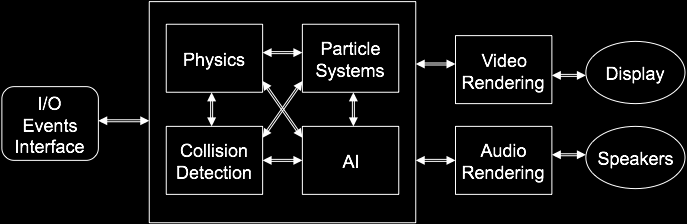
- Renderer
- Physics engine
- Particle system
- Cinematic system
- Entity, resources, state manager
- Sound handling routines
- Tools to interact with the above said systems
- Anything else the authors might be able to think of.
Game Engine
The Renderer
- The Renderer - probably the most common ground for game engines.
- It creates the visual display of the scene for the player / viewer
so they can make appropriate decisions based upon what's displayed.
- The renderer is where over 50% of the CPU's processing time is
spent, and where game developers will often be judged the most
harshly.
- The representation of 3D models is also part of the renderer or
closely related and must be well specified and documented.
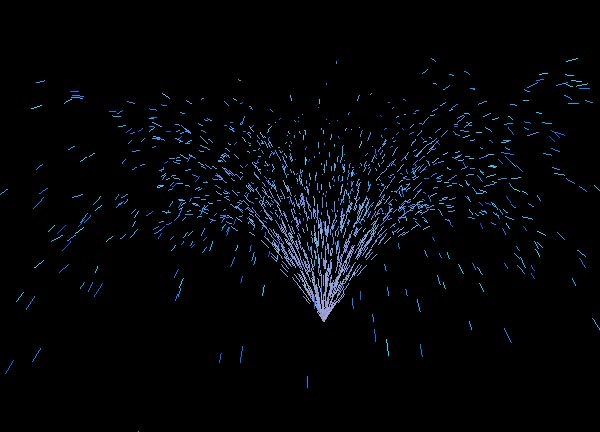
Example of renderer output
The Physics Engine
- The Physics Engine - the component simulating the laws of physics,
dealing with the physical behavior of the game objects and their
interaction.
- It creates the cause-effect relationship among the possible states
of the game world.
- Motion, collision detection, object transformation (breaking,
ripping, exploding).
Particle System
- Particle systems - a common model for special effects like sky,
water, fog, fire, explosions, sparks, bolts.
- A particle system is a collection of entities, related or
unrelated, that comply with a set of logical and physical rules. The
components of a basic particle system are: an emitter, particles, and
particle modifiers.
- A particle has different attributes, such as: velocity, position,
size, affecting force, color, age, etc. The emitter is the object
responsible for emitting the particles into the scene and giving them
initial properties. Once these properties have been set, they can
later be modified by the modifiers.
- A visual effect can be made up by many particle systems. A burning
fire, for example, could consist of one particle system for the
flames, one for the smoke, and another one for emitting sparks.
Particle Life Cycle
- Generation - Particles in the system are generated randomly within
a predetermined location of the fuzzy object.
- Particle Dynamics - The attributes of each of the particles may
vary over time. They can be functions of both time, other particle
attributes, and attributes of other particles. Ex. position(previous
position, velocity).
- Extinction - Each particle has two attributes dealing with length
of existence: age and lifetime. A particle's life can end early for
other reasons, such as running off bounds, hitting the ground, some
attribute reaching a limit.
Example
Flocking Behavior
- Reynolds (1987) modeled the behavior of birds moving in a flock
using a particle system. Particles called boids.
- Collision avoidance - The boid tries to avoid collision with other
boids or obstacles.
- Velocity matching - Each boid attempts to go the same speed and
direction as neighboring boids.
- Flock centering - Each boid attempts to stay close to nearby
flockmates.
Example - modeling fire

- Suppose that the color represents the particle's temperature
(fire).
- The color of the particle in the next frame gets modified to add a
contribution from surrounding particles, each weighted by the inverse
of the distance.
- The color also decays over time by a factor.
- If the particle gets cold enough, it is extinguished.
Game Cinematics
- A cinematic is a section in a game which is like a very short
movie. The player loses control of the game and watches passively.
- Cinematics can range from a few seconds to a few minutes.
- Cinematics animated or filmed separately from the game and then
later integrated into the game are called "pre-rendered cinematics,"
"FMV" (full-motion video), "cut scenes," or "CG (computer graphics)
cinematics."
- Cinematics created with the game engine are called "in-game
cinematics" or "real-time cinematics".
- Opening cinematic: usually pre-rendered cinematic used at the
beginning of the game or even as a trailer.
- Examples: http://www.gametrailers.com/,
http://www.apple.com/games/trailers/.
Entity Manager
- Every object in the game is considered an entity.
- Most entities have all the properties of a rigid body in addition
to the game specific data that goes along with them.
- This component should make sure the entities are updated
appropriately. Some game engines provide mechanisms to add AI agents
to control entities.
Other Managers
- Resource manager - The engine should be able to provide tools for
loading and caching the many types of resource data that a game
needs. This includes images, audio, models, maps, etc.
- Some of the loaders can be stream-based for the case for networked
games that need to acquire resources from a server.
- State manager A game is generally broken up into several states,
like the introduction, the menus, playing the game, etc.
- The state manager is responsible for creating states, adding
states to the engine, the transition between states, the UI.
Sound Library
- Example of a sound library: OpenAL (Open Audio Library), a
cross-platform open source 3D audio API: www.openal.org. Used by many
game engines.
- The library models a collection of audio sources moving in a 3D
space that are heard by a single listener somewhere in that space.
- The basic OpenAL objects are listener, source, and buffer.
- There can be a large number of buffers, which contain audio
data. Each buffer can be attached to one or more sources, which
represent points in 3D space which are emitting audio.
- There is always one listener object representing the position
where the sources are heard.
- Rendering is done from the perspective of the listener.
Example - Placing the Listener
// OpenGL camera position and orientation
gluLookAt(listenerPos[0], listenerPos[1], listenerPos[2], // camera position
          (listenerPos[0] + sin(listenerAngle)),
          listenerPos[1], (listenerPos[2] - cos(listenerAngle)), // camera direction
          0.0, 1.0, 0.0); // vertical axis of the camera
// OpenAL - place listener at camera
alListener3f(AL_POSITION, listenerPos[0], listenerPos[1], listenerPos[2]);
float directionvect[6] = {sin(listenerAngle), 0, cos(listenerAngle), 0, 1, 0};
alListenerfv(AL_ORIENTATION, directionvect);
Sound Management
- Sound material properties - the sounds being played can be
modified by filters for effects like underwater, echo, obstruction and
occlusion detection.
- Mixing sounds - playing several well-defined sounds at the same
time. Some sound cards allow you up to a given number of sounds to mix
(like 16). Otherwise it must be done by the software.
- Game music - can be prerecorded and stored in some format (avi,
mp3), which is expensive in terms of memory or playback time. The
second approach is to code up a MIDI track using preset
samples. Companies specialize in creating music for games:
www.fatman.com.
Examples of Game Engines - Top 10 on DevMaster.net 2007
Free
- OGRE
- Crystal Space
- Irrlicht
- jME
- Reality Factory
- RealmForge GDK
- Panda3D
- The Nebula Device 2
- OpenSceneGraph
- Axiom
Commercial
- Torque Game Engine
- TV3D SDK 6
- 3DGameStudio
- Reality Engine
- Deep Creator
- Cipher
- 3Impact
- AgentFX
- 3D Rad
- Quest3D
Top 10 on DevMaster.net 2009
Free
- OGRE
- Irrlicht
- Crystal Space
- Panda3D
- jME
- Blender Game Engine
- Reality Factory
- The Nebula Device 2
- RealmForge
- OpenSceneGraph
Commercial
- C4 Engine
- Torque Game Engine
- 3DGameStudio
- TV3D SDK 6.5
- Leadwerks Engine 2
- Unity
- NeoAxis Engine
- DX Studio
- Esenthel Engine
- Visual3D.NET Game Engine
Top 10 on DevMaster.net 2011
- Ogre
- Torque Game Engine
- Power Render
- Jet3D
- Unreal Engine 3
- Auran Jet
- Jupiter
- Cafu Engine
- Game Byro
- Source (Valve)
- CryEngine
Top 10 on DevMaster.net 2013
- C4 Engine
- Panda3D
- DX Studio
- Unreal Development Kit ( UDK)
- Visual3D Game Engine
- OGRE
- 3DGameStudio
- Irrlicht
- NeoAxis Engine
- Crystal Space
Case Detail - Ogre - www.ogre3d.org
- Multi-platform (Win, Linux, Mac), C++, object
oriented. Independent of DirectX or OpenGL (support for
both). Dependant on 3rd party libraries.
- Material: a native material declaration language, supports materials
defined externally, multitexture, volumetric texture, LOD,
transparency.
- Meshes: export from applications like Milkshape, Blender, skeletal
animation, skinning, progressive meshes.
- Scenes: scene-graph based, scene query features.
- Special effects: particle systems, billboards, skyboxes, planes, domes.
- Animation: skeletal, inverse kinematics, blending.