Dana Vrajitoru
I310 Multimedia Arts and Technology
Video Media
Video Project
- Integrating animation, sound, and text information in a complex
project.
- One of the most popular and effective uses of multimedia for all
sorts of applications.
- Video clip: recorded with an external camera and transferred on
the computer, or directly produced using software.
- Video editing: projects combining video and audio clips, creating
transitions and superpositions, special effects, etc.
Video Standards
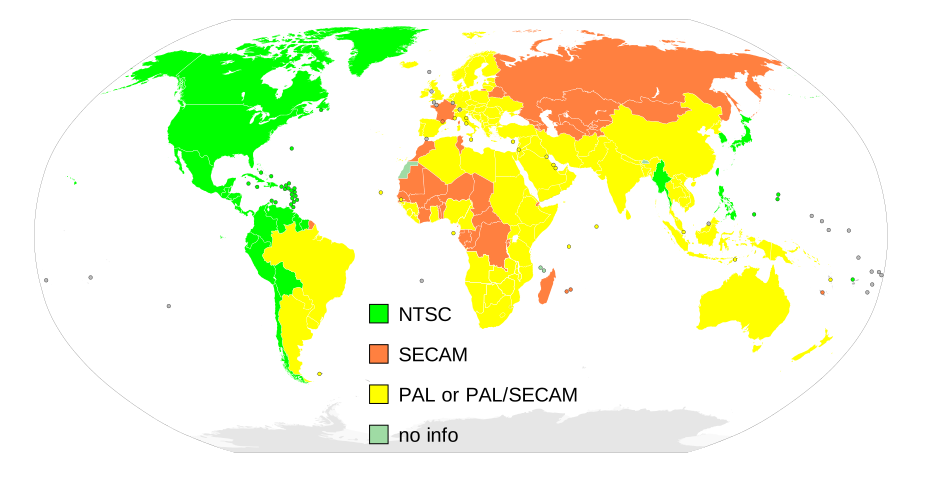
- Analog formats: NTSC, Pal, Secam
- NTSC - National Television Standard Committee. America (N & S),
Australia.
- PAL - Phase Alternating Line, Europe, Asia, Africa, Oceania,
Australia, S America
- Secam - Sequentiel Couleur a Memoire- France, Eastern Europe,
Asia, Africa
- These are gradually being replaced with digital formats:
- DTV (Digital Television), and
- ATSC DTV which can encode several (4-5) standard channels or 1 HD
(high definition) channel.
- Region Free format.
Video Systems by Region
Video Acquisition
- Direct acquisition: some cameras record directly in mpeg
format. Transfer = file copy.
- Digital video camera: stores the video in digital format, can be
easily transferred to a computer using a FireWire connection (faster
than USB) and specialized recording (capture) software (like DVgate).
- Analog format: needs special equipment to convert to digital
format (for example, a digital camera can take input from an analog
VCR).
Video Editing Software
- Free software: Windows: Windows Movie Maker, VirtualDub, Virtual
Edit; Mac: iMovie
- Professional: Adobe Premiere and Adobe AfterEffects, Final Cut,
Sony Vegas Studio, Magix Movie Edit, Pinnacle Studio, Avid Express
etc.
- DVD writing software: Ulead Video Studio, MyDVD Studio, Roxio DVD,
DVD Movie Factory, WinDVD Creator, iDVD.
- http://video-editing-software-review.toptenreviews.com/
Video Editing
- Basic idea: creating a Project with a Timeline or Storyboard,
containing one or more video/audio superimposed tracks.
- Individual clips are imported in the project. Parts of them can be
added to the timeline in sequence.
- Transitions can be added between various clips in the timeline.
- Special effects can be added to individual clips.
Titles
- Plain fonts and sans serif are recommended, bold and large enough
to be easily read.
- Use a good contrast in color and lightness between the text and
the background.
- Use drop shadow to make the text more easily visible.
- Let the text on screen long enough to be read.
- Keep the important titles and graphics in the "safe area" of the
screen.
- Avoid too much text on the screen at one - you can always use
several pages instead.